Building a Type-Safe Go + React SPA, Part 1: Developer Environment
An end-to-end type-safe Go + React SPA template
This is a multi-part blog post describing a template for writing end-to-end type-safe apps using Go and React.
You can find the template repository here - go-react-template.
For a real production app built using this template, see - temporal-lens.
Dependency Management
My favorite tool for this is mise-en-place. It is super simple to setup and more importantly, impossible not to find the dependency you’re looking for unlike some of the nix-based dev environments I will mention later.
I have this .mise.toml at the project root.
1
2
3
4
5
6
7
8
9
10
11
12
13
14
15
16
17
[env]
_.file = ".env"

[tools]
"make" = "4.4.1"
"node" = "24"
"go" = "1.27.1"
"go:go.uber.org/mock/mockgen" = "v0.6.0"
"go:golang.org/x/vuln/cmd/govulncheck" = "v1.8.0"
"golangci-lint" = "2.13.2"
"buf" = "1.72.0"
"tilt" = "0.37.7"
"protoc-gen-go" = "1.36.12"
"protoc-gen-connect-go" = "1.20.0"
"npm:@bufbuild/protoc-gen-es" = "2.14.1"
"npm:@connectrpc/protoc-gen-connect-query" = "2.3.1"
"npm:sfw" = "2.0.6"
The go: and npm: backends cover majority of the tools I will ever need.
It also automatically loads the .env file whenever the project directory is entered.
Also, if your shell is configured as mentioned in the docs, you never need to use the mise exec -- prefix. Just use the tools like you would with a normal OS install. Even AI agents can use these tools since mise automatically adds them to the PATH whenever you enter the project directory.
Your editor will also find the right tools for the project, provided you launch it from within the project directory. I usually launch VSCode as code . from inside the project directory.
Alternatives Considered
In the past, I have used devbox which creates a nix-based developer environment.
It is also pretty easy to setup with a devbox.json at the project root describing the versions of nix packages you would like to install for the project.
It also provides the same end developer experience as mise with the tools automatically added to PATH and the .env automatically sourced when you enter the project directory if you combine it with direnv.
Devbox also has a built-in process manager using process-compose, but I prefer a different process manager. See the Process Manager section below. I prefer one tool for one job.
The reason I no longer recommend devbox is because package versions are slow to update in nixpkgs and some packages like buf plugins are non-existent in nixpkgs.
Task Runner
There are several good choices here - Just, Task. Honestly, you can’t go wrong with either of those, but, I prefer the good old Makefile simply because it does everything I need it to do.
Here is what my Makefile looks like.
1
2
3
4
5
6
7
8
9
10
11
12
13
14
15
16
17
18
19
20
21
22
23
24
25
26
27
28
29
30
31
32
33
34
35
36
37
38
39
40
41
42
43
44
45
46
47
48
49
50
51
52
53
54
55
56
57
58
59
60
61
62
63
64
65
66
67
68
69
70
71
72
73
74
75
76
77
78
79
80
81
82
83
84
85
86
87
88
89
90
91
92
93
94
95
96
97
98
99
100
101
102
103
104
105
106
107
108
109
110
111
112
113
114
115
116
117
118
119
120
121
122
123
124
125
126
127
128
129
130
131
132
133
134
135
136
137
138
139
140
141
142
143
144
145
146
147
148
149
SHELL := /usr/bin/env bash
.DEFAULT_GOAL := help
.NOTPARALLEL:

# ------------------------------------
#  Vars
# ------------------------------------

VERSION                ?= $(shell git describe --tags --always --dirty 2>/dev/null || echo "dev")
COMMIT                 ?= $(shell git rev-parse --short HEAD 2>/dev/null || echo "unknown")
BUILD_TIME             ?= $(shell date -u +"%Y-%m-%dT%H:%M:%SZ")
LDFLAGS                := -ldflags "-X github.com/varunbpatil/go-react-template/version.Version=$(VERSION) -X github.com/varunbpatil/go-react-template/version.GitCommit=$(COMMIT) -X github.com/varunbpatil/go-react-template/version.BuildTime=$(BUILD_TIME)"
WAIT_FOR               ?=
WAIT_FOR_RETRY_SECONDS ?= 1

# ------------------------------------
#  Help
# ------------------------------------

.PHONY: help
help: ## Show this help message
	@awk 'BEGIN {FS = ":.*?## "; prev = "#"} /^[a-zA-Z/_-]+:.*?## / { split($$1, a, "/"); key = (a[2] != "") ? a[1] : "_"; if (key != prev) { if (prev != "#") printf "\n"; prev = key } printf "  \033[36m%-20s\033[0m %s\n", $$1, $$2 }' $(MAKEFILE_LIST)

# ------------------------------------
#  Go
# ------------------------------------

.PHONY: go/build
go/build: ## Build the application
	go build $(LDFLAGS) -o bin/go-react-template ./cmd/service

.PHONY: go/build-ui
go/build-ui: ## Build the application with embedded UI assets
	go build -tags=ui $(LDFLAGS) -o bin/go-react-template ./cmd/service

.PHONY: go/run
go/run: ## Run the application
	go run ./cmd/service

.PHONY: go/test
go/test: ## Run unit tests
	go test -race ./... -count=1

.PHONY: go/test-integration
go/test-integration: ## Run integration tests
	go test -race -tags=integration ./integration_tests/... -count=1

.PHONY: go/lint
go/lint: ## Run linter
	golangci-lint run --build-tags=all --fix

.PHONY: go/fmt
go/fmt: ## Format code
	golangci-lint fmt

.PHONY: go/vet
go/vet: ## Run go vet
	go vet -tags=all ./...

.PHONY: go/fix
go/fix: ## Run go fix
	go fix -tags=all ./...

.PHONY: go/tidy
go/tidy: ## Tidy and verify go.mod
	go mod tidy
	go mod verify

.PHONY: go/mocks
go/mocks: ## Generate Go interface mocks
	mockgen -destination=mocks/users.go -package=mocks github.com/varunbpatil/go-react-template/domains/users/ports Service,Repository

.PHONY: go/vulncheck
go/vulncheck: ## Check for vulnerabilities
	govulncheck ./...

# ------------------------------------
#  Protobuf
# ------------------------------------

.PHONY: proto/generate
proto/generate: ## Generate protobuf code
	NODE_OPTIONS="--disable-warning=ExperimentalWarning" buf generate

.PHONY: proto/lint
proto/lint: ## Lint protobuf files
	buf lint

.PHONY: proto/fmt
proto/fmt: ## Format protobuf files
	buf format -w

.PHONY: proto/breaking
proto/breaking: ## Check for breaking changes
	buf breaking --against '.git#branch=main'

# ------------------------------------
#  React
# ------------------------------------

.PHONY: ui/install
ui/install: ## Install UI dependencies
	cd ui && sfw npm ci

.PHONY: ui/dev
ui/dev: ## Start UI dev server
	cd ui && npm run dev

.PHONY: ui/build
ui/build: ## Build UI for production
	cd ui && npm run build

.PHONY: ui/lint
ui/lint: ## Lint UI code
	cd ui && npm run lint

.PHONY: ui/lint-fix
ui/lint-fix: ## Fix UI lint issues, including suggestions
	cd ui && npm run lint-fix

.PHONY: ui/fmt
ui/fmt: ## Format UI code
	cd ui && npm run fmt

.PHONY: ui/fmt-check
ui/fmt-check: ## Check UI formatting
	cd ui && npm run fmt-check

# ------------------------------------
#  Docker
# ------------------------------------

.PHONY: docker/build
docker/build: ## Build Docker image
	docker build --build-arg VERSION=$(VERSION) --build-arg COMMIT=$(COMMIT) --build-arg BUILD_TIME=$(BUILD_TIME) -t go-react-template .

.PHONY: docker/run
docker/run: ## Run the Docker image with environment variables from .env
	docker_env=(); \
	while IFS= read -r name; do docker_env+=(--env "$$name"); done < <(sed -nE 's/^[[:space:]]*([A-Za-z_][A-Za-z0-9_]*)=.*/\1/p' .env); \
	docker run --net host "$${docker_env[@]}" go-react-template

# ------------------------------------
#  Local dependencies
# ------------------------------------

.PHONY: wait
wait: # Wait for WAIT_FOR, an HTTP(S) URL or host:port
	@WAIT_FOR="$(WAIT_FOR)" WAIT_FOR_RETRY_SECONDS="$(WAIT_FOR_RETRY_SECONDS)" scripts/wait.sh
The naming convention for the targets is something I picked up a long time ago from the Let’s Go book. They are grouped by domain - all the Go related tasks have go/, all the protobuf related tasks have protobuf/, all the UI related tasks have ui/, etc.
This serves two purposes:
- The
helpcommand shows targets grouped by domain.1 2 3 4 5 6 7 8 9 10 11 12 13 14 15 16 17 18 19 20 21 22 23 24 25 26 27 28 29 30 31
❯ make help help Show this help message go/build Build the application go/build-ui Build the application with embedded UI assets go/run Run the application go/test Run unit tests go/test-integration Run integration tests go/lint Run linter go/fmt Format code go/vet Run go vet go/fix Run go fix go/tidy Tidy and verify go.mod go/mocks Generate Go interface mocks go/vulncheck Check for vulnerabilities proto/generate Generate protobuf code proto/lint Lint protobuf files proto/fmt Format protobuf files proto/breaking Check for breaking changes ui/install Install UI dependencies ui/dev Start UI dev server ui/build Build UI for production ui/lint Lint UI code ui/lint-fix Fix UI lint issues, including suggestions ui/fmt Format UI code ui/fmt-check Check UI formatting docker/build Build Docker image docker/run Run the Docker image with environment variables from .env
- The shell provides auto-completion automatically. This is what it looks like in my fish shell.
1
2
3
❯ make go/<tab>
go/build     (Target)  go/fix  (Target)  go/lint   (Target)  go/run   (Target)  go/test-integration  (Target)  go/vet        (Target)
go/build-ui  (Target)  go/fmt  (Target)  go/mocks  (Target)  go/test  (Target)  go/tidy              (Target)  go/vulncheck  (Target)
This is a good time to clarify the weirdness of the docker/run target. Docker has an open issue where it fails to read quoted environment variables the same way that the shell does. Specifically, it treats quotes as part of the value itself. So, a .env file with quoted values that mise is able to source correctly doesn’t work directly with docker run --env-file. Hence the need to extract individual environment variables and pass them individually to docker run.
Process Manager
Docker Compose is the preferred way to run containerized services for development. But, not all services in your project need to be containerized during development. What about the Go service you are working on? What about the React frontend you are working on?
People tend to use standalone tools like air or wgo for hot code reloading their Go code. Frontend code usually has a npm run dev for hot code reloading as well. You will then find tucked away somewhere in the Makefile, a target to run air/wgo. The problem with this is that it is not a cohesive setup. Your container logs will have to be viewed in one place, your Go app logs in another, and your UI logs in yet another place. Starting and stopping all of these individual pieces is a pita.
There is a far superior solution - Tilt. Don’t be discouraged by its homepage which says “Kubernetes for Dev”. You won’t be needing or running anything Kubernetes related if you don’t want to.
The advantage of Tilt is that it can run your docker compose services and local services side-by-side as a single cohesive unit. It even provides a nice web-UI where you can see the status and logs of all your services (containerized and local), filter logs, and start/stop/restart individual services. It even provides hot code reloading. Best of all, a single command tilt up starts your entire development environment and tilt down brings it down.
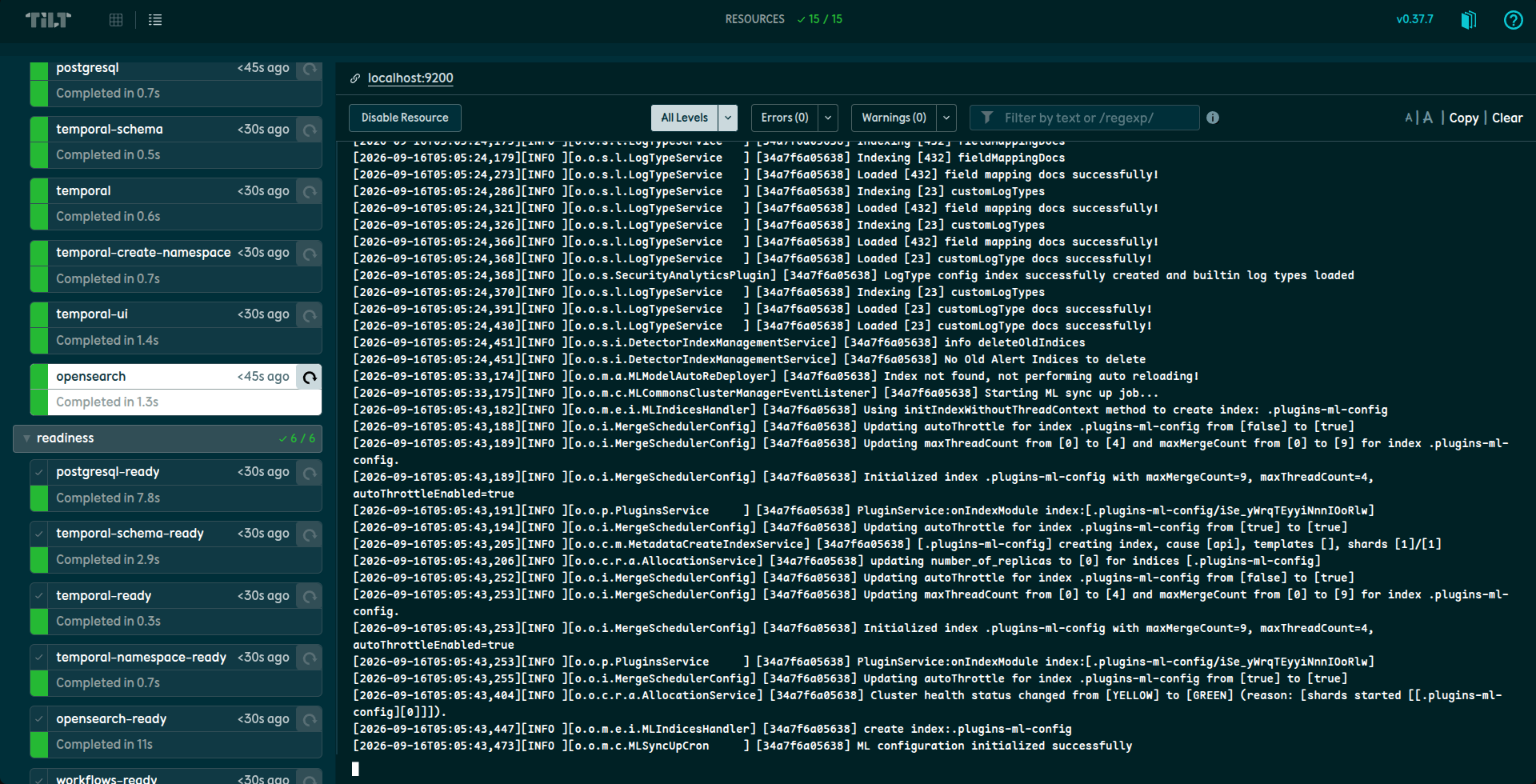 Tilt Web UI
Tilt is configured using a Tiltfile at the project root. The dialect looks very much like Python, but it is actually starlark.
1
2
3
4
5
6
7
8
9
10
11
12
13
14
15
16
17
18
19
20
21
22
23
24
25
26
27
28
29
30
31
32
33
34
35
36
37
38
39
40
41
42
43
44
45
46
47
48
49
50
51
52
53
# ------------------------------------------------------------------------------
# DOCKER COMPOSE SERVICES
# ------------------------------------------------------------------------------

docker_compose("docker-compose.yml")

dc_resource(
    "postgresql",
    labels=["dependencies"],
)

# ------------------------------------------------------------------------------
# LOCAL SERVICES
# ------------------------------------------------------------------------------

# Main service
local_resource(
    "main",
    serve_cmd="make go/run",
    resource_deps=["postgresql-ready"],
    allow_parallel=True,
    labels=["services"],
)

# React frontend
local_resource(
    "ui",
    serve_cmd="make ui/dev",
    links=["http://localhost:5173"],
    resource_deps=["main-ready"],
    allow_parallel=True,
    labels=["services"],
)

# ------------------------------------------------------------------------------
# READINESS CHECKS
# ------------------------------------------------------------------------------

local_resource(
    "postgresql-ready",
    cmd="until docker compose exec -T postgresql pg_isready -U postgres; do sleep 1; done",
    resource_deps=["postgresql"],
    allow_parallel=True,
    labels=["readiness"],
)

local_resource(
    "main-ready",
    cmd="make wait WAIT_FOR=localhost:8080",
    resource_deps=["main"],
    allow_parallel=True,
    labels=["readiness"],
)
This is a very simple Tiltfile. You can see a real production Tiltfile here. The file is cleanly divided into 3 sections - docker compose services, local services and readiness checks.
The readiness checks section is worth discussing. Tilt does not obey the depends_on attribute in the docker-compose.yml file. This is an open issue. So, if one service needs to wait for another service to be ready before starting, the readiness checks have to be explicitly declared and depended on via resource_deps. In the above example, the Go service has resource_deps = ["postgresql-ready"], which means the Go service will only start after the postgresql readiness check passes. Similarly, the React UI will only be started after the Go service is accepting connections on the HTTP port. A tiny wait.sh script provides common wait primitives.